Best 3D printing tools and finishing kit
Quick answer
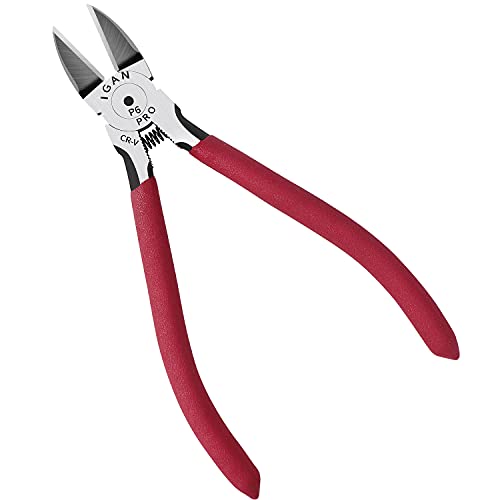
A real flush cutter like the under-$25 Klein Tools D275-5 is the one tool every printer owner should own for clean support and purge-line removal; a full 68-piece finishing kit at under $50 is worth it only once post-processing more than a couple of prints a month.

Klein Tools D275-5 Diagonal Flush Cutting Pliers, 5-Inch
A true flush cutter leaves a clean, nub-free cut on supports and purge lines that ordinary scissors or side cutters cannot match, and it doubles as a filament trimmer at the spool.
The three tiers
Beginner: Best single tool
a new printer owner who has not bought any finishing tools yet- Beginner pick
Klein Tools D275-5 Diagonal Flush Cutting Pliers, 5-Inch
Under $25 Check priceBudget range; the button shows the current price
A dedicated flush cutter is the single most useful post-processing tool because supports, purge lines and filament all need clean cuts regularly, and a flush-ground blade leaves almost no nub compared to a standard diagonal cutter. This is a real precision tool, not a 3D-print-branded kit, and it will outlast cheaper cutters that dull quickly on PLA and PETG.
Not for: nobody, honestly; a flush cutter has no real downside for any printer owner, though someone who already owns a quality pair of flush cutters from another hobby does not need a second one
Intermediate: Best full finishing kit
someone finishing more than a couple of prints a month who wants deburring, filing, scraping and drilling covered in one purchase
This 68-piece kit bundles deburring blades, scrapers, files, a hand drill and tweezers in a storage case, which covers most of the actual post-processing steps a print needs, removing supports cleanly, cleaning up overhangs, opening up a hole that printed slightly undersized, without buying each tool separately.
Not for: someone who only prints a couple of one-off parts a year; a flush cutter and a plastic scraper cover that level of use, and a 68-piece case will mostly sit unused
Expert: Best for dimensional accuracy
anyone calibrating flow rate, checking nozzle wear, or printing functional parts that need to hold a tolerance
A digital caliper with a large LCD and auto-off feature gives a real, repeatable measurement in inches or millimeters, which matters for calibrating flow rate, verifying a nozzle has not worn oversized, or confirming a functional part actually printed to the dimension it was designed for. Eyeballing these numbers is not good enough once a part needs to fit something else.
Not for: a hobbyist printing decorative models with no fit requirement; a caliper is a precision tool for engineering work, and there is nothing wrong with skipping it if nothing you print needs to fit a tolerance
| Tool | Price | Type | Best for |
|---|---|---|---|
| Klein Tools D275-5 Flush Cutter | Under $25 | Single tool | Clean support and purge line removal |
| 68-Piece Tool Kit with Case | Under $50 | Full finishing kit | Regular post-processing across many prints |
| Digital Caliper (6 inch) | Under $50 | Measuring tool | Calibration and functional-part tolerances |
What is the single most useful 3D printing tool to own?
A real flush cutter. Nearly every print, regardless of material or purpose, involves cutting something: support material, a purge line, or the filament itself when swapping spools. A flush-ground blade leaves a clean, nearly nub-free cut where a standard side cutter or scissors leaves a visible pip, and that difference shows up on the finished surface of a part every time supports touched it.
When does a full finishing kit make sense over buying tools individually?
A full kit earns its cost once post-processing happens regularly enough that having deburring blades, files, scrapers and a hand drill all in one labeled case saves real time versus hunting for individual tools. For someone finishing one print every few weeks, a flush cutter and a cheap plastic scraper cover nearly everything a kit would, at a fraction of the price.
Why would a hobbyist need a digital caliper?
A caliper matters once a printed part needs to fit something else: a bracket that has to clear a specific gap, a replacement part matching a broken original, or a shaft that needs a snug press fit. Slicer software reports theoretical dimensions, but actual flow rate, cooling and nozzle wear all shift a printed dimension slightly from that theoretical number. A caliper is how that gap gets caught before the part is installed and found not to fit.
Do resin prints need different finishing tools than FDM prints?
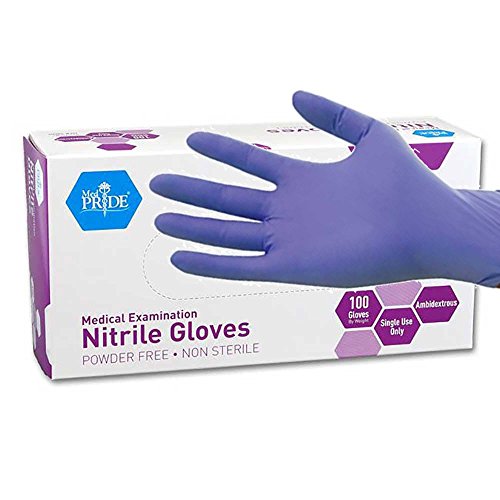
Mostly the same tools apply, a flush cutter for supports and a deburring tool for edges, but resin work adds handling requirements that FDM does not: nitrile gloves for skin protection against uncured resin, since it is a skin sensitiser, and proper disposal of used isopropyl alcohol rather than pouring it down a drain. These are handling precautions, not extra finishing tools, but they belong in the same kit.
How we chose
This roundup is researched from manufacturer listings and published specifications, not from in-person testing. Every product named is checked against PrintFarmCalc's own catalog of verified Amazon listings before it is recommended.
The deciding factors were whether a tool solves a specific, recurring post-processing task, cutting, deburring or measuring, and whether the scope of a kit, single tool versus full case, matches how often a given user actually finishes prints.
Buying tips
A flush cutter is not the same as a wire cutter
A true flush cutter has one flat-ground blade face, which lets it cut almost perfectly level with a surface, ideal for support nubs and purge line stubs. A standard side or wire cutter leaves a visible pip on one side of the cut because both blade faces are beveled. For clean support removal specifically, the flush design matters.
Deburring tools work on more than just resin
A deburring tool with interchangeable blades is useful on FDM parts too, cleaning up the ridge left where support touched a surface, or smoothing a printed hole's edge. A kit with multiple blade profiles handles curved and flat edges differently, which a single fixed blade cannot.
Nitrile gloves belong in a resin workflow, not just a chemistry lab
Uncured resin is a skin sensitiser, meaning repeated bare-hand contact can trigger an allergic reaction over time even if a single touch causes no visible reaction. Nitrile gloves during handling, along with ventilation, are the standard precaution, and used isopropyl alcohol from cleanup is not something to pour down a drain.
Buy a caliper once it actually matters
A digital caliper is worth owning once a print needs to fit another part, a bracket, an enclosure, a replacement component, since slicer-reported dimensions and the actual printed part can differ slightly due to flow rate and cooling. For purely decorative prints, this precision has no real payoff.
Other options worth knowing about
- BOENFU
BOENFU Wire Cutters Heavy Duty Snips Flush Cut Side Cutters Pliers
Under $25 Check priceBudget range; the button shows the current price - Supmedic
Supmedic Soft Max Medical Nitrile Exam Gloves Powder-Free Blue 100 Pcs (L)
Under $25 Check priceBudget range; the button shows the current price - MED PRIDE
MedPride Powder-Free Nitrile Exam Gloves, Iris Blue, Medium, Box/100
Under $25 Check priceBudget range; the button shows the current price


Safety
Common questions
What is the difference between a flush cutter and a regular wire cutter?
A flush cutter has one blade face ground flat, which lets it cut nearly level with a surface, ideal for removing support nubs and purge lines cleanly. A regular wire or side cutter has both blade faces beveled, which leaves a visible pip on one side of the cut. For clean removal on visible surfaces, the flush design is worth the extra cost over a generic cutter.
Do I need a full tool kit as a beginner?
Not right away. A single quality flush cutter covers the most common post-processing task, removing supports and purge lines, for most early prints. A full kit becomes worth buying once post-processing is happening regularly enough that having deburring blades, files and a scraper all in one case saves real time.
What is a deburring tool used for on 3D prints?
A deburring tool with interchangeable blades cleans up the small ridges and rough edges left where supports touched a surface, or smooths the edge of a printed hole. It is useful on FDM parts as well as resin prints, and a kit with multiple blade profiles handles curved and flat edges more effectively than a single fixed blade.
When do I actually need a digital caliper?
Once a printed part needs to fit something else precisely, a bracket, a replacement part, a component with a specific tolerance, a caliper catches the gap between the theoretical dimension in the slicer and the actual printed dimension, which shifts slightly due to flow rate, cooling and nozzle wear. Purely decorative prints usually do not need this precision.
Do nitrile gloves matter for FDM printing, or only resin?
Gloves matter far more for resin printing, since uncured resin is a skin sensitiser and repeated bare-hand contact can cause a reaction over time. FDM filament and finished parts generally do not require gloves for basic handling, though gloves are still reasonable when handling hot nozzles, sharp support material, or cleaning chemicals.