Best desktop CO2 laser cutters
Quick answer
The OMTech K40+ 45W with LightBurn (under $750) gives a hobbyist real 45W cutting power (as listed) and included software for less than a Glowforge Aura, and it is the best desktop CO2 laser cutter for someone willing to set up their own enclosure and exhaust ducting.

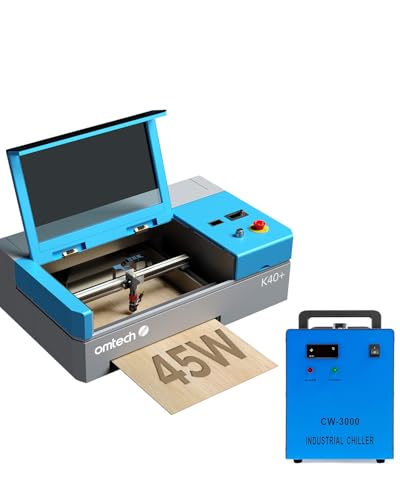
OMTech K40+ 45W CO2 Laser Engraver & Cutter with LightBurn
A 45W CO2 tube (as listed) actually cuts wood and acrylic in a single pass, and LightBurn is included instead of being a separate purchase, which is the real cost gap between this and the base K40+.
The three tiers
Beginner: Easiest to start
someone who wants a CO2 laser that behaves like an appliance and does not want to learn mirror alignment or exhaust plumbing on day one- Beginner pick
Glowforge Aura 6W Laser Engraver & Cutter with HD Camera & 12-in Workspace
Under $1,000 Check priceBudget range; the button shows the current price

The Glowforge Aura is a fully enclosed, camera-guided machine with a 12-in workspace (as listed), so placement and focus are handled by the software instead of the owner. At under $1,000 it costs more than an OMTech, but the setup time it saves is real for a first CO2 machine.
Not for: anyone who needs to cut 1/4 inch hardwood or thick acrylic regularly. The 6W module (as listed) is built for engraving and thin material, not deep single-pass cuts
Intermediate: Best value
a hobbyist ready to learn LightBurn and set up their own enclosure and exhaust ducting for real cutting depth- Intermediate pick
OMTech K40+ 45W CO2 Laser Engraver & Cutter with LightBurn
Under $750 Check priceBudget range; the button shows the current price
At under $750 this K40+ carries a 45W tube (as listed), enough to cut hardwood and cast acrylic in a single pass, and includes LightBurn rather than requiring a separate software purchase. It ships as an open-frame-adjacent box that still needs its own exhaust routed outside and periodic mirror alignment.
Not for: someone who wants to unbox a machine and start cutting the same afternoon with no setup
Expert: Best for ventilation-free shops
a shared workspace or apartment shop that cannot run exhaust ducting outside a window or wall- Expert pick
Glowforge Aura Laser Engraver & Cutter with Craft Laser Filter
Under $1,500 Check priceBudget range; the button shows the current price

The Glowforge Aura with Craft Laser Filter adds integrated filtration on top of the Aura's enclosed, camera-guided platform for under $1,500, which removes the need for external ducting entirely. That is a real advantage for a bedroom, apartment or shared studio where venting outside is not possible.
Not for: anyone who already has exhaust ducting run to the outside. The OMTech K40+ above cuts thicker material faster for less than half the price once ventilation is not the deciding factor.
| Model | Price | Tube power (as listed) | Enclosure | Software |
|---|---|---|---|---|
| OMTech K40+ 45W | Under $750 | 45W | Boxed frame | Not included |
| OMTech K40+ 45W with LightBurn | Under $750 | 45W | Boxed frame | LightBurn included |
| Glowforge Aura 6W | Under $1,000 | 6W | Fully enclosed | Cloud app |
| Glowforge Aura with Craft Laser Filter | Under $1,500 | Not stated | Fully enclosed with filtration | Cloud app |
Why does a CO2 laser cost more than a diode laser?
A CO2 laser uses a gas-filled glass tube and mirrors to route the beam to the cutting head, which is a more complex and more expensive system to build than a single diode module. In exchange, a CO2 laser cuts faster, cuts thicker material in fewer passes, and is the only realistic desktop option for engraving glass or cutting clear acrylic, since clear acrylic transmits a diode's wavelength instead of absorbing it.
Is a K40-style laser cutter beginner-friendly?
Not in the same way an appliance is. A K40-style machine typically arrives needing mirror alignment, a water cooling loop set up, and exhaust ducting installed before the first real cut. None of that is difficult, but it is real setup work that an enclosed, camera-guided machine like the Glowforge Aura largely removes.
The tradeoff is price and raw cutting power per dollar: the K40+ costs less and cuts more material per watt of tube power than the lower-power Aura, so the choice comes down to whether the owner would rather spend time on setup or spend money to skip it.
Do I still need ventilation with an enclosed CO2 laser?
Yes. An enclosure contains the beam and reduces stray smoke in the room, but a machine that is actually cutting still needs the smoke removed, either through ducting to the outdoors or, on models built for it, an integrated filter designed for that airflow. An enclosure alone does not eliminate the exhaust requirement.
How we chose
This roundup is researched from manufacturer listings and published specifications, not from in-person testing of these specific units. Every product named is checked against PrintFarmCalc's own catalog of verified Amazon listings before it is recommended.
For CO2 cutters specifically, the deciding factors were listed tube wattage, whether the enclosure and exhaust path are built in or left to the owner, and whether cutting software is included or sold separately.
Buying tips
A glass CO2 tube needs active cooling
K40-style machines use a water-cooled glass tube, not a sealed cartridge. Budget for a cooling setup, a small reservoir and pump or a dedicated chiller, as part of the real cost of ownership, not an optional extra.
Exhaust has to go outside, not just into a filter box
A CO2 laser cutting wood or acrylic produces real smoke volume. Ducting routed through a window or wall to the outdoors is the standard setup; a carbon filter alone is a supplement for light odor control, not a substitute for outdoor exhaust on a machine used regularly.
Included software changes the real price
Some CO2 cutters ship with LightBurn included, and others expect the owner to buy or license cutting software separately. Compare the out-the-door price, not just the sticker price, before deciding a cheaper-looking listing is actually cheaper.
CO2 glasses are not interchangeable with diode glasses
A CO2 beam sits at 10.6 microns, far outside the range that diode-rated glasses (safety-glasses-diode) block. Use glasses rated specifically for CO2 (safety-glasses-co2) with any machine in this roundup, and never swap in a diode-rated pair.
Other options worth knowing about
- OMTech
OMTech K40+ 45W Desktop CO2 Laser Engraver & Cutter
Under $750 Check priceBudget range; the button shows the current price - OMTech
OMTech K40+ 45W CO2 Laser Engraver & Cutter with CW-3000 Chiller
Under $1,000 Check priceBudget range; the button shows the current price - OMTech
OMTech K40+ 45W CO2 Laser Engraver with LightBurn & Water Chiller
Under $1,000 Check priceBudget range; the button shows the current price


Safety
Common questions
What is the best desktop CO2 laser cutter for a hobbyist?
The OMTech K40+ 45W with LightBurn, at under $750, gives real 45W cutting power (as listed) and included software for less than a Glowforge Aura. It requires the owner to handle enclosure, cooling and exhaust setup, which is the tradeoff for the lower price and higher power per dollar.
Can a CO2 laser cut clear acrylic?
Yes. Clear acrylic absorbs a CO2 laser's 10.6 micron wavelength and cuts cleanly, unlike a diode laser, which the material is transparent to at any power. If cutting clear acrylic is a planned use, a CO2 machine is the correct tool, not a diode engraver.
Does a K40-style laser cutter need water cooling?
Yes. The glass CO2 tube in a K40-style machine is water-cooled, typically with a small pump and reservoir or an external chiller. Running the tube without adequate cooling shortens its life significantly, so this is a required part of setup, not an optional upgrade.
Is Glowforge worth the extra money over an OMTech K40?
For someone who values an enclosed, camera-guided, low-setup experience over raw cutting power per dollar, yes. The OMTech K40+ cuts thicker material faster for less money, but expects the owner to handle enclosure, cooling and exhaust. Glowforge trades cutting depth and price for a much shorter path from unboxing to a finished cut.
Can I run a CO2 laser cutter indoors without outside ventilation?
Only with a machine specifically designed for it, such as one with an integrated filtration system built for the airflow the laser produces. A standard carbon filter box is a supplement for light odor, not a substitute for proper exhaust on a machine cutting wood or acrylic regularly.