Best diode laser engravers
Quick answer
The Ortur Laser Master 3 (10000mW as listed) covers a 400 x 400mm working area for under $500, and it is the best all-around diode laser engraver for a hobbyist who wants real working room without paying $700 or more.

Ortur Laser Master 3, 10000mW Laser Engraver, 400×400mm Working Area
A 400 x 400mm bed and a 10000mW module (as listed) cover most craft and sign work at a price that still leaves room in the budget for air assist and a fume extractor.
The three tiers
Beginner: Best first machine
a first-time buyer who wants to learn focus, speed and power settings without spending real money- Beginner pick
ATOMSTACK Swift 12000mW Laser Engraver & Cutter for Beginners
Under $250 Check priceBudget range; the button shows the current price

The ATOMSTACK Swift is sold and priced as an entry unit, under $250 with a 12000mW module (as listed), so a new owner can afford a few burned test tiles while learning. It is a bare, open-frame module with no camera and no auto focus, which keeps the price down but puts more of the setup work on the owner.
Not for: anyone who wants automatic focus, a positioning camera or a fully enclosed housing straight out of the box
Intermediate: Best value
a hobbyist ready to size up the work area and move from engraving into light cutting- Intermediate pick
Ortur Laser Master 3, 10000mW Laser Engraver, 400×400mm Working Area
Under $500 Check priceBudget range; the button shows the current price
At under $500 the Laser Master 3 more than doubles the beginner unit's bed to 400 x 400mm while keeping the same 10000mW module (as listed), so full sign blanks and plywood ornaments fit in one setup without repositioning the stock. It is still open-frame, so a fume extractor and dedicated ventilation are required, not optional.
Not for: anyone working in a shared or unventilated room without a way to route fumes outside
Expert: Performance ceiling
someone running repeat batches who wants auto focus, a positioning camera and an enclosure built in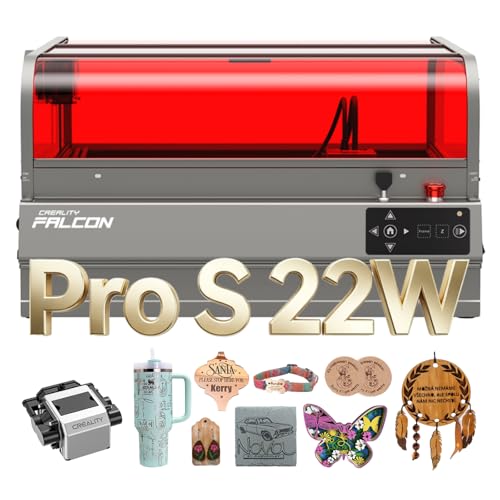
The Falcon2 Pro S bundles an integrated enclosure, auto focus, a positioning camera and air assist for under $1,000, with a 22W module (as listed) driving cuts up to 600mm/s (as listed) through thicker stock. Auto cut-through and camera-guided placement save real time once a shop is running more than one job a day.
Not for: a first-time buyer, or anyone engraving a handful of items in a normal month. The automation and enclosure are wasted at low volume, and the beginner tier machine above does the same core job for about a sixth of the price.
| Model | Price | Power (as listed) | Bed size (as listed) | Enclosed |
|---|---|---|---|---|
| ATOMSTACK Swift | Under $250 | 12000mW | Not stated | No, open-frame |
| Ortur Laser Master 3 | Under $500 | 10000mW | 400 x 400mm | No, open-frame |
| ATOMSTACK A20 PRO V2 | Under $500 | 20W | Not stated | No, open-frame |
| Creality Falcon2 Pro S | Under $1,000 | 22W | Not stated | Yes, integrated enclosure |
How much can a diode laser actually cut?
A diode laser engraves nearly anything it can mark and cuts thin, laser-friendly material, plywood, basswood, dark cast acrylic and paper, in one or more passes depending on the module's power and the thickness of the stock. It does not cut metal and it cannot cut clear or transparent acrylic at any power, because clear acrylic transmits the diode's wavelength instead of absorbing it.
For anything thicker than a few millimeters of hardwood, expect several passes at reduced speed rather than a single fast cut. A CO2 laser is the better tool for routine cutting of thicker or harder stock.
Do I need an enclosure on a diode laser engraver?
An enclosure is not required to operate a diode laser, but it does two useful things: it blocks stray light from the open beam and it contains smoke so an extraction fan has something to actually pull out, instead of chasing fumes around an open room. Every enclosed or open machine still needs its exhaust routed outside, not filtered and recirculated indoors, when cutting or engraving anything that produces visible smoke.
Buyers on a tight budget usually start with an open-frame machine and add a dedicated ventilated space; buyers running the machine daily in a shared room tend to value the enclosure enough to pay for it.
What safety glasses does a diode laser need?
A diode module in this class emits around 445nm, so it needs glasses rated for that wavelength range (safety-glasses-diode), not glasses rated for a CO2 laser's 10.6 micron beam. Wearing the wrong pair gives a false sense of protection and no actual protection at all.
Diode or CO2: which one should I actually buy?
A diode engraver is cheaper to buy, cheaper to run and good enough for wood, leather, paper and dark acrylic. A CO2 machine costs more up front but cuts faster, cuts thicker material in fewer passes, and is the only realistic option for cutting clear acrylic or engraving glass. Buy diode first if the budget is under $400 and the work is mostly engraving; step up to CO2 once cutting speed or clear acrylic becomes a real requirement.
How we chose
This roundup is researched from manufacturer listings, published wattage figures and buyer-facing feature claims such as enclosure, auto focus, camera and air assist, not from in-person testing of these specific units.
We weighted a documented bed size and a stated safety or automation feature, Class 1 rating, full enclosure or auto air assist, above raw wattage claims, because marketed diode power is frequently an electrical input figure rather than an optical output figure, and the two are not the same number.
Buying tips
Marketed wattage is often electrical, not optical
A listing that advertises a large wattage number is usually describing the power the module draws from the wall, not the optical power that actually reaches the material. Two machines with the same listed wattage can cut at noticeably different speeds. Treat the number as a rough comparison point between listings from the same brand, not an absolute spec.
An open-frame machine needs its own room, not just a fan
A diode module without an enclosure sends smoke and fine particulate straight into the room. A box fan pointed at a window helps but does not substitute for ducted extraction routed outside. Never laser PVC, vinyl or faux leather that is actually PVC: it releases chlorine gas that damages the machine and harms whoever is breathing the room air.
Match your glasses to the laser, every single time
A diode laser emits around 445nm. Glasses rated for that wavelength (safety-glasses-diode) block it; glasses rated for a 10.6 micron CO2 laser do not, and the reverse is also true. If a household or shop has both machine types, keep the two pairs of glasses physically separated and labeled so nobody grabs the wrong pair by habit.
Decide cutting or engraving before you shop on watts
Engraving only marks a surface and tolerates a lower-power module fine. Cutting through material, even thin plywood or basswood, needs either a higher-power module or multiple slow passes at a lower one. Buy for the job that is actually planned, not the highest wattage number on the page.
Other options worth knowing about
- DAJA
DAJA DJ6Pro 10W Enclosed Laser Engraver Machine Desktop Laser Cutter
Under $500 Check priceBudget range; the button shows the current price


Safety
Common questions
What is the best diode laser engraver for the money?
The Ortur Laser Master 3, at under $500 with a 400 x 400mm bed and a 10000mW module (as listed), gives the most working room per dollar in this class. Cheaper machines exist but shrink the bed size, and pricier ones mostly add an enclosure, camera and auto focus rather than more raw cutting ability.
Can a diode laser engraver cut metal?
No. A diode laser engraver can mark or discolor bare metal with the right coating spray or by darkening an anodized finish, but it cannot cut through metal. Cutting metal requires a fiber laser, a different technology entirely from the diode and CO2 machines covered in this roundup.
Is a more expensive diode laser always more powerful?
Not necessarily. Price differences above roughly $400 usually pay for an enclosure, a positioning camera, auto focus and faster travel speed rather than a proportionally stronger module. Compare the listed wattage of two machines directly before assuming the pricier one cuts deeper or faster.
Do I need air assist with a diode laser engraver?
Air assist is not required to operate the laser, but it clears smoke and debris from the cut line as it happens, which produces cleaner edges and reduces flare-ups on wood. Several diode engravers in this class support an add-on air assist pump sold separately; check the listing before assuming one is included.
What should I never put under a diode laser?
Never laser PVC, vinyl, or faux leather that is actually PVC: burning it releases chlorine gas, which corrodes the machine and is hazardous to breathe. Polycarbonate, ABS and PTFE also give off harmful fumes. When a material is not clearly identified, do not assume it is safe to cut.