How to choose your first 3D printer
Quick answer
A first 3D printer with auto bed leveling, such as the Creality Ender 3 V3 SE (under $250) or the Bambu Lab A1 mini (under $250), removes the single most common cause of failed first prints; build volume, top speed and multicolor capability matter far less to a beginner than a reliable first layer.
This buying framework, budget bands, prioritizing auto leveling, starting on the smallest reasonable build volume, is a practical convention built from how the hobby is commonly taught. The hotend flow figures used to explain speed and future upgrades are published manufacturer figures.
What should a first 3D printer cost?
Reliable beginner-oriented FDM printers are widely available from under $200 up to around $400. Below that band, machines tend to skip auto leveling or use nonstandard, harder-to-source hotend parts, which adds friction for someone who has never printed before. Above it, the extra money mostly buys speed, build volume and multicolor hardware that a first-time owner rarely needs in the first few months.
It is reasonable to spend more if a specific feature is wanted from day one, such as an enclosure for future ABS printing. It is not necessary to spend more just to get a print that works.
Does a first printer need auto bed leveling?
Yes, treat it as close to non-negotiable. Bed leveling is the most common reason a first layer fails to stick, and a new owner does not yet have the experience to diagnose a slightly uneven bed by eye. A printer that levels itself, or checks and compensates before every print, removes that failure point entirely.
Machines like the Creality Ender 3 V3 SE ship with auto leveling built in at a low price point specifically to solve this problem for new owners. Some higher-end machines, such as the Bambu Lab A1 mini and Bambu Lab P1S, go further with a full pre-flight calibration routine before each print.
How much build volume does a beginner actually need?
Less than most people assume. Early projects, brackets, small enclosures, phone stands, calibration cubes, comfortably fit inside a compact build volume. A larger printer costs more, takes up more bench space, and on some designs carries more moving mass that is harder to keep calibrated while a new owner is still learning the basics.
A large-format printer is worth buying once actual project needs are clear, after the first few dozen prints, rather than guessed at before a single part has been made.
Open frame or enclosed for a first machine?
An open-frame printer, the standard layout for most budget machines, is cheaper and easier to service, but it is more sensitive to household drafts, which can warp larger PLA and PETG prints near an open window or vent. An enclosed printer costs more but tolerates a garage or workshop environment better and is required later for materials like ABS and ASA.
A beginner printing mostly PLA indoors does not need an enclosure to get good results. It becomes worth paying for once ABS, ASA or a less climate-stable room enters the picture.
Does the hotend matter for a first printer, or is that an upgrade for later?
It is an upgrade for later. Stock hotends on beginner printers are typically PTFE-lined and manage roughly 12 mm3/s of volumetric flow, which is plenty for learning PLA and PETG at normal speeds. An all-metal hotend, such as the Microswiss all-metal hotend kit, raises that ceiling to around 20 mm3/s and also tolerates higher temperatures needed for some engineering filaments; a high-flow design like the POLISI3D volcano-style hotend can reach roughly 32 mm3/s for faster printing once the rest of the setup is dialed in.
None of this needs to be decided on day one. Start on the stock hotend, learn the printer's behavior, and upgrade only once a specific speed or material need shows up.
Which filament should load first?
PLA, with a density of about 1.24 g/cm3, is the standard first filament. It runs at the widest margin of error of any common material, produces the least odor, and forgives the small mistakes a new owner will make while learning bed adhesion, retraction and cooling settings. Save PETG, ABS, ASA and TPU for after a handful of clean PLA prints.
What else should I buy alongside the printer itself?
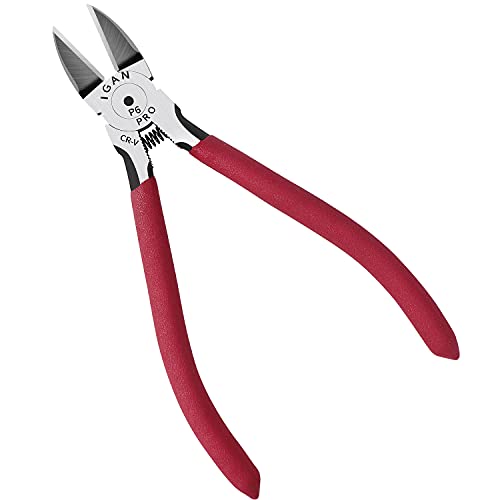
A small set of finishing tools makes the first few weeks noticeably easier: flush cutters for trimming filament and support material cleanly, a deburring tool for smoothing print edges, and a digital caliper for checking whether a part actually printed to the size it was supposed to. None of these are expensive, and none are optional once real projects start needing to fit against other parts.
| Factor | Why it matters | What to look for |
|---|---|---|
| Auto bed leveling | Prevents the most common first-print failure | Built-in leveling or pre-flight calibration |
| Build volume | Most early projects are small | A compact build volume is enough to start |
| Enclosure | Only needed for ABS/ASA or unstable room temperatures | Open frame is fine for PLA and PETG indoors |
| Hotend | Sets the real speed ceiling, not the headline speed spec | Stock PTFE is fine to start; upgrade later |
| Spare parts | Beginners jam nozzles and scratch plates while learning | Nozzles, plates and hotend parts sold separately |
Equipment mentioned here
- BOENFU
BOENFU Wire Cutters Heavy Duty Snips Flush Cut Side Cutters Pliers
Under $25 Check priceBudget range; the button shows the current price - PEASUG
Deburring Tool with 12 HSS Blades for Metal Resin PVC 3D Print
Under $25 Check priceBudget range; the button shows the current price - KLEIN TOOLS
Klein Tools D275-5 Diagonal Flush Cutting Pliers, 5-Inch
Under $25 Check priceBudget range; the button shows the current price - SARABURU
Deburring Tool 3D Printing for Resin PLA with Flush Cutters
Under $25 Check priceBudget range; the button shows the current price


Safety
Common questions
Is a cheap 3D printer good enough to learn on?
Yes, as long as it has auto bed leveling. A printer like the Creality Ender 3 V3 SE, priced under $200, includes leveling and uses a widely supported hotend and nozzle standard, which means parts and troubleshooting advice are easy to find. Price alone is a poor predictor of whether a first printer will frustrate a new owner.
Should I buy a multicolor printer as my first machine?
Not for a first printer. Multicolor systems add complexity, more moving parts, and more points of failure while a new owner is still learning basic single-color printing. Learn bed adhesion, retraction and material handling on a single-color machine first, then consider a multicolor upgrade once those basics are solid.
Do I need to know volumetric flow numbers before buying a printer?
No, but it helps explain why two printers with similar top speed specs can perform very differently in practice. A stock hotend manages roughly 12 mm3/s regardless of how fast the motion system can move, so a printer's real speed ceiling comes from its hotend, not its marketing speed number.
How much should I budget for accessories beyond the printer?
Plan for a modest amount beyond the printer price: spare nozzles, bed adhesive or a fresh build plate, a set of finishing tools like flush cutters and a deburring tool, and a first spool or two of PLA. None of these individually cost much, but skipping them often means a stalled first week of printing while waiting on a missing part.
Is an open-frame printer safe to run in a bedroom or living space?
Printing PLA on an open-frame printer indoors is common and produces minimal fumes. Materials like ABS and ASA emit more VOCs and are better suited to a garage, workshop or an enclosed printer paired with real ventilation, not a bedroom or another space where someone spends hours breathing the air.