Setting up air assist
Quick answer
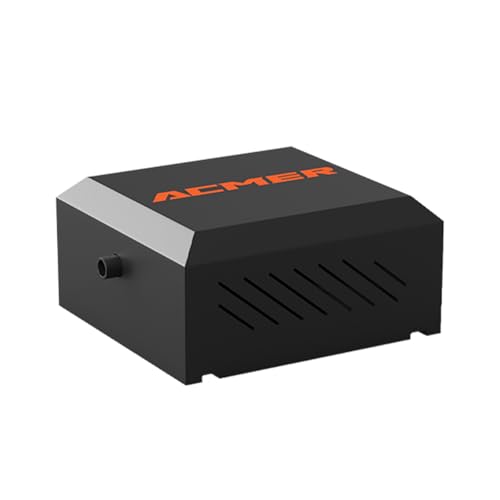
Run air assist at roughly 10 to 20 L/min at 3 to 8 psi for engraving wood, leather or card, up to 30 to 60 L/min at 15 to 30 psi for cutting thick wood, but back down to just 5 to 15 L/min at 2 to 6 psi for cutting acrylic, since strong airflow frosts the molten cut edge and ruins the polished finish; an adjustable pump such as the ACMER C4 air assist pump (under $100) covers this whole range on one dial.
These L/min and psi ranges reflect widely shared community and manufacturer settings for common job types, not a single published standard, so treat them as a starting point to fine-tune on scrap material.
What does air assist actually do?
Air assist does two separate jobs at the cutting head. First, it clears smoke away from the lens so the beam is not attenuated as it passes through a haze of soot on its way down to the material. Second, it blows debris and molten material out of the kerf as the beam cuts, so each pass down through the material reaches fresh, unobstructed surface instead of cutting through its own smoke and char.
Because those two jobs need different things, there is no single correct pressure. Engraving mostly needs the first job, clearing smoke off the lens, so light airflow is enough. Deep cutting needs the second job as well, clearing a kerf that gets deeper and harder to flush with every pass, so it needs meaningfully more air.
How much air do I need for engraving versus cutting?
Engraving wood, leather or card generally wants 10 to 20 L/min at 3 to 8 psi, just enough to keep the lens clear without disturbing fine detail. Cutting thin wood steps up to 20 to 30 L/min at 8 to 15 psi, since the beam is now removing material all the way through rather than just marking the surface. Cutting thick wood needs the most air of the wood-based jobs, 30 to 60 L/min at 15 to 30 psi, because a deep kerf traps debris and smoke far more than a shallow one.
Why is less air better when cutting acrylic?
Cutting acrylic is the case that proves more air is not always better: it wants just 5 to 15 L/min at 2 to 6 psi, deliberately lower than even light engraving on wood. Acrylic cuts by melting rather than burning away, and that molten edge is what gives a laser-cut acrylic piece its glossy, polished look. Strong airflow across that molten edge cools it unevenly and disturbs it before it can re-solidify smoothly, leaving a frosted, cloudy edge instead of a clear one.
If an acrylic cut comes out frosted or hazy along the edge and the focus and power settings are already correct, the air assist pressure is very often the actual culprit rather than the laser settings themselves.
What psi and L/min should I start at for a new material?
Start near the low end of the range for the job type, engraving or cutting, and the material family, wood or acrylic, then run a small test cut on scrap. Increase air only if you see soot streaking along the cut edge or smoke visibly lingering over the beam path rather than being pulled away immediately. Reduce air if the edge looks frosted or uneven on acrylic, or if fine engraved detail on wood looks blown out or fuzzy at the edges.
How do I know my air assist pressure is too high or too low?
Too little air shows up as smoke haze hanging over the cutting head, darker than expected char along cut edges, and a lens that needs cleaning more often than it should. Too much air shows up differently depending on material: frosted, unevenly melted edges on acrylic, or fine detail losing crispness on engraved wood and leather as the airflow disturbs material before the beam fully finishes its pass.
Do I need an adjustable pump or is a fixed one enough?
A fixed-output pump works fine if you only ever cut one material in a narrow thickness range, but the spread between acrylic's 5 to 15 L/min and thick wood's 30 to 60 L/min is wide enough that most users cutting more than one material end up wanting an adjustable pump. An adjustable unit such as the 30L/min adjustable air assist pump (under $100) lets you dial pressure down for acrylic and back up for wood without swapping hardware between jobs.
| Job | Flow rate | Pressure |
|---|---|---|
| Engraving wood, leather or card | 10 to 20 L/min | 3 to 8 psi |
| Cutting thin wood | 20 to 30 L/min | 8 to 15 psi |
| Cutting thick wood | 30 to 60 L/min | 15 to 30 psi |
| Cutting acrylic | 5 to 15 L/min | 2 to 6 psi |
Equipment mentioned here
- ANNOY TOOLS
Air Assist for Laser Cutter and Engraver 30L/Min Adjustable Air Assist Pump
Under $100 Check priceBudget range; the button shows the current price - Longer
Longer Cut Engraver Air Assist Kit with Air Pump, for Ray5 10W/20W Laser Engravers
Under $100 Check priceBudget range; the button shows the current price - ACMER
ACMER C4 Air Assist Pump Kit, 30L/Min Adjustable Airflow for Laser Engraver
Under $100 Check priceBudget range; the button shows the current price


Safety
Common questions
What air assist settings work for engraving wood or leather?
Roughly 10 to 20 L/min at 3 to 8 psi is enough for most engraving work on wood, leather or card. This is only meant to keep smoke off the lens, since engraving does not need to flush a deep kerf the way a through-cut does.
What air assist settings work for cutting thick wood?
Cutting thick wood generally needs 30 to 60 L/min at 15 to 30 psi, the highest range of the common jobs, because a deep kerf traps smoke and debris that a shallow engrave or thin cut never has to deal with.
Why does more air ruin an acrylic cut?
Acrylic cuts by melting, and its glossy edge comes from that melted material re-solidifying smoothly. Strong airflow disturbs and unevenly cools the molten edge before it can settle, leaving a frosted or cloudy look instead of a clear one, which is why acrylic wants only 5 to 15 L/min at 2 to 6 psi.
What are the two jobs air assist does?
Air assist clears smoke away from the lens so the beam is not weakened passing through it, and it blows debris and molten material out of the kerf so each pass reaches fresh material. Engraving mostly needs the first job; deep cutting needs both.
Do I need a separate pump or does my laser have one built in?
Many diode lasers ship with a basic fixed-output pump or none at all, while some higher-end machines include auto air assist. A separate adjustable pump is worth adding if your machine lacks one or if you regularly switch between acrylic and wood, since those two materials want very different pressures.